Nov 3, 2026
by Jay Campbell
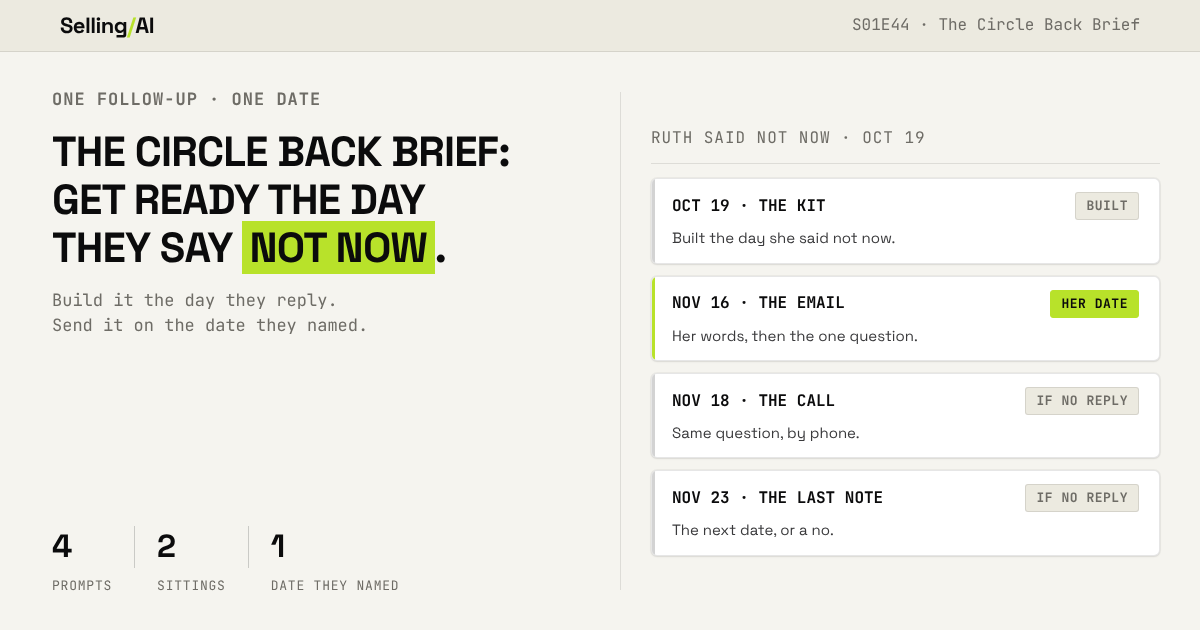
S01E44: The Circle Back Brief. Five minutes of prep today = a better follow up later.
The short answer
Build it on the day they reply. Send it on the date they named.

This Week in AI Sales
Google Sheets now shows its sources, cell by cell. Google's update, dated October 28th, says Fill with Gemini now lists the web sources behind every cell it generates (on the web version of Sheets, up to 3,000 cells per request). It's for Business and Enterprise Standard or Plus, and Google AI Pro or Ultra. So put your target accounts in a Sheet, run one research column... and open the sources before any of it goes in an email. (Seriously, open them.)
The Gemini app now builds files you can edit before they leave the chat. Google's update from October 29th says it's available now on Workspace and personal Google accounts. You ask for a deck or a tracker, you preview it and edit it right there in Gemini, then you open it in Slides or Sheets. So next time you get off a discovery call, have it build the next-steps tracker and clean it up there before anybody else sees it.
Let's begin
I have a quick exercise for you. Open your inbox and search "next quarter." Then "after the holidays." Then "reach out in January."
(Go ahead, I'll wait.)
Somewhere in there is a person who told you, in writing, exactly when to come back. They picked the date... and a lot of them even told you why. So count them up. How many people named a date, how many of those dates already passed, and how many of those people actually heard from you on that date with something better than "hey, you asked me to check back"?
And I know how this goes, because Ive done it. You got the reply, you made a task in the CRM, and you went back to the deals that were actually moving. Then the morning of, the task popped up in between two other things... and you wrote the email on your way to a call.
They gave you ten weeks to get ready for one email. And you wrote it in the four seconds before you hit send.
I've closed hundreds of deals that started with a not now. I also told you about the one that went from June to Q3 to Q4 to Q1 and never closed, where I pushed the date out three months and "stayed in touch." It's the persistence, as well as the diligence, that makes this work. You come back when they said to, and you keep coming back until you get an answer... and every single time you show up, youve done the homework for that specific day.
So this week we're building a kit for one follow-up. You build it the day they say not now, and it sits in your calendar on the date they named. Four steps, two sittings: three today, and one that morning. And the very first thing it does is the part most of us skip... it reads the reason they
gave you. Because a buyer who says "we're finishing our quarter close" just told you what they'll be able to answer when you come back.
Why the Calendar Reminder Fails
So here's what a calendar reminder actually hands you on the day: "follow up with Ruth." That's it. By the time it fires, you've forgotten what Ruth said, why she said it, and whatever smart thing you meant to bring her. The date is the only thing you've got left... so the date is what you write about. And "you asked me to check back" tells her nothing she didnt already know.
Meanwhile, your sequence tool never got the message. It keeps right on sending automated touches. (Don’t make this mistake, I have… it SUCKS)
And then, silence. Some reps take that as a no and drop it, even though the buyer named that date themselves. Other reps move the date out another three months and "stay in touch." Which, yes, is exactly what I did on that June deal.
And the timing makes all of this worse right now. For the next eight weeks, sellers everywhere are going to hear "come back in January." And all of those emails go out the same week.
Build the Follow-Up the Day They Say Not Now
The day they reply, you still remember the call, the reason and what you wanted to say. So that's the day you build it... and you save it in your calendar on the date they named.

Here's the whole thing running on Ruth Okafor, the Controller at Pellwood Logistics. She's a made-up buyer from the example account in Deal OS (which is free now, if you missed that last week), and Sam Reyes is the made-up rep working her. Here's her reply, from October 19th:
Not now. We are finishing our quarter close. Ask me again on Monday, November 16, 2026.
Ruth Okafor - Pellwood Logistics
Step 1: The Promise Record
Paste in the whole thread, plus whatever you already had scheduled for this person.
Build a promise record from this reply. Use only what is below. Today's date is the date of this chat. If you cannot tell it, ask me before you write anything. The whole thread:
[PASTE IT] My planned touches to this person:
[PASTE THEM, OR WRITE NONE] My name:
[YOUR NAME] 1. Their exact words: copy the whole reply if it is short, or the sentences with the not now, the reason and the date, letter for letter, in quote marks.
2. The date: the date they named, written out with its weekday and year. Work the weekday out with code, never in your head. If the weekday they wrote does not match the date, tell me. If they named a season or a quarter instead of a date ("Q1", "after the holidays"), write NO DATE and give me one plain question that gets a real date.
3. The reason: the reason they gave, in their words. No reason given: NONE.
4. The permission: what they said I can do and when. If they asked me to stop contacting them, write STOP and write nothing after it.
5. What stops today: every planned touch before that date, by date and channel, so I can cancel each one.
6. The reply I send today: confirm the date and that I will not write before then. Under 40 words, signed with my name. No ask and no pitch. No em dashes, and never "just", "touch base" or "circle back". If they named no date, the reply asks the question from line 2 instead.
On Ruth, it found five touches Sam had already scheduled that needed to be cancelled, and wrote this:
Ruth, understood. I'll reach back out on Monday, November 16, 2026. Let me know if you have any questions before then. Sam Reyes
Send that today. Now she knows you actually heard her... and you've made a promise of your own to keep.
If they said "Q1" instead of a date, the record comes back NO DATE, with a question to get one. Go get it. A real date is the sign of a real reason (that's Signal 2 in S01E31), and you cant build a kit for "sometime next year."
Step 2: The Date Brief
This one's the diligence. Feed it the record, your notes, and what you sell.
Here is my promise record:
[PASTE STEP 1] Here is everything else I know about this person and their company:
[PASTE YOUR NOTES, RECON OR CALL NOTES] Here is what I sell and the proof I'm allowed to share:
[PASTE IT] Me: [NAME, COMPANY, PHONE]
Two times I can meet after that date: [TIME 1], [TIME 2] Build the date brief for the date in the promise record. Use only what is above. Leave out anything unsourced or personal. At the top: them, me and my two times. 1. What will be true for them that day. Work from the reason they gave. Every line starts KNOWN (they said it or a source says it, with the source and its date) or GUESS (you inferred it). Never write a GUESS as a fact.
2. What they can tell me that day that they could not tell me today. Then, separately, what they could have told me already and I never asked.
3. The one question the follow-up should ask, built from 1 and 2. If it rests on a GUESS, say which one.
4. The one thing I should bring: a number, a page or a comparison I can build from what is above and am allowed to share. If I cannot build it yet, tell me exactly what I need to get.
5. Who else could be involved by then, by name or title. UNKNOWN if my notes do not say.
6. What to recheck that morning: every fact I plan to use that could go stale, and where to check it.
7. The calendar: using code, confirm that date and my two times are business days and not public holidays where they are. You can use your own knowledge of the holiday calendar for this. If one fails, tell me and give me the nearest business day.
Line 2 is the whole reason this step exists. On October 19th, Ruth couldnt tell Sam how long the close took... because it was still running. On November 16th she can. So the brief came back with one question, built straight out of her own excuse:
How many days did that close take, start to finish?
Sam Reyes
It also marked that question as resting on a GUESS, because she never actually said the close would be done by the 16th. And then it listed seven things Sam could've asked already and never did, including invoice volume, the ERP and who runs AP day to day. (That list stung. And this is a made-up deal.)
The number to look at here: how many lines say KNOWN, and how many say GUESS. If it's nearly all GUESS... you've got some homework to do before that date.
Step 3: The Date Kit

Now it writes everything you'll need that day. You paste the whole block into a calendar event on that date... and you get to stop carrying it around in your head.
Build the date kit for this person, for the date in my promise record. Use only my promise record and date brief above. Write it as one block of plain text I can paste into a calendar event on that date. At the top: their name, title and company, me, and the recheck list from the brief. In every part of the kit, mark each fact that could go stale with [RECHECK]. 1. THE EMAIL, sent on the date. Opens with their own words, quoted, and the date they named. Then the one question from the brief. Then the one thing I'm bringing. Then one ask with my two times. Under 90 words, not counting [RECHECK].
2. THE CALL, on the second business day after the email, only if there is no reply by then. An opener under 50 words that gets to the same question. Then a voicemail under 35 words.
3. THE LAST NOTE, one week after the email if there is still no reply. Says this is my last note on it and asks for one thing: the next date to come back, or a no. Under 50 words. After this, nothing more unless they write back.
4. THE THING I'M BRINGING. Write it in full. Say whether it goes with the email or waits for the meeting. Label anything I still have to get with [I NEED THIS].
5. IF THEY SAY YES. The next message, one line, with the time they picked and who else should be on it.
6. IF THEY SAY NOT NOW AGAIN. A reply under 40 words that asks for the next date. Under it, this rule for me: same reason and a real new date, start a new promise record. Reason changed, or no date, stop and check whether this deal is dead.
7. IF THEY SAY NO. One line that closes it with no pitch. Under it: record the stop and contact them no further. Everywhere: no em dashes, and never "just", "checking in", "touch base", "circle back", "bump" or "as promised". Anything you cannot source goes in a [BRACKET] for me to fill in. Never guess.
Here's the email it wrote for Ruth, unedited:
Ruth, "Not now. We are finishing our quarter close. Ask me again on Monday, November 16, 2026." That is today, so I am asking. How many days did that close take, start to finish? I am bringing one comparison: a regional food distributor (8,000 invoices a month) went from an 8-day close to a 4-day close in two quarters. [RECHECK] Can we talk Thursday, November 19, 2026 at 10:00 a.m. Central or Monday, November 23, 2026 at 2:00 p.m. Central? [RECHECK] Sam Reyes
And here's the persistence part, written down before you ever need it:
2. THE CALL. Wednesday, November 18, 2026, only if there is no reply by then. Opener:
Ruth, Sam Reyes at Ledgerline. You asked me to ask again on November 16, so I emailed you that day. How many days did that quarter close take, start to finish? 3. THE LAST NOTE. Monday, November 23, 2026, if there is still no reply. This is the same day as my second time. Ruth, this is my last note on this. What is the next date to come back to you, or is this a no?
So you already know what happens on the 18th and the 23rd... and none of it depends on how you feel about Ruth that week. If she names a new date, you run this again for that date. If her reason changes, or she wont give you a date at all, the kit tells you to stop and check whether the deal is dead (and the Dead Deal Scanner is built for exactly that).
Step 4: The Morning-Of Check
A kit you wrote in October is full of October facts. So the morning it goes out, you open the pages on its recheck list and run this.
Today is [DATE], and this kit goes out today. Here is my date kit:
[PASTE IT] Here is what I found this morning, for each item on the kit's recheck list:
[PASTE WHAT EACH PAGE SAYS NOW, AND ANYTHING FROM THEM SINCE I WROTE THE KIT. OR, IF THIS CHAT HAS LIVE WEB, TELL IT WHICH PAGES TO READ.] 1. Are they still in that role? If not, or if they already replied, stop and tell me what to do instead.
2. Go through every [RECHECK]. Mark each one CURRENT, CHANGED (what it says now, and the source) or NOT CHECKED. If a source is gone, say so and take out anything that quotes it.
3. Anything new that changes the question or the thing I'm bringing, with its source. If something new gives me a better reason to write, tell me in one line and leave the email alone. That call is mine.
4. Your verdict: SEND, REWRITE or HOLD. One line why. Any fact in the email still NOT CHECKED means it does not go until I clear it, so list those.
5. If REWRITE, give me every part of the kit that changed, changing only what the check changed. If HOLD, give me the date to look again. Use only what is above. Add nothing I did not paste or you did not read.
To test it on Ruth, I made up two things that changed between October and November: Pellwood opened a 15th warehouse, and the AP Clerk job post the kit quotes came down. Here's what came back:
Verdict: REWRITE. The page you're bringing has a wrong warehouse count and quotes a post that is
gone; every fact in the email is CURRENT.Your AI vendor of choice
Without this step, Sam walks into that meeting with a page that says 14 warehouses and quotes a job post that doesnt exist anymore... in front of the Controller of that company. (Not great.) It also told Sam the 15th warehouse "may give you a better reason to write than the date alone," and then left the email alone, because that call is Sam's to make.
Why This Works
The date is theirs. They told you when, in writing... and on the day, you're quoting it right back to them. Pretty hard to call that pushy.
The reason tells you what to ask. Quarter close? Ask about the close. New VP starting in March? Ask what the new VP wants changed. Whatever they hid behind is the exact thing they'll be able to talk about when the date comes.
The persistence is decided in advance. The call and the last note are already on your calendar with dates on them, so you dont have to talk yourself into them that week. And the last note ends it cleanly, either way.
What I havent figured out yet. I've closed a lot of deals off a not now, but I havent run these four prompts on a live one yet. And Ruth cant reply... because Ruth doesnt exist. So I cant tell you what this does to your reply rate. That email's question also rests on a guess (that her close is actually
finished), and the morning-of check only tests facts, so reading that guess is on you. And the kit put Sam's last note on the same Monday as Sam's second meeting time, said so, and just... left it there. Fix that kind of thing by hand.
Rep Action this week
Run that inbox search. Take the five most recent people who named a date, and build the kit for the nearest date that's still ahead of you.
For a date that already passed, run the same steps anyway, and own it in the first line of the email: you told me October 1st, and I'm a month late. Thats still way better than a "checking in" with no date on it.
The number I want by Friday: named dates that passed with no follow-up. Hit reply and send me that one number. I want to know how big this is across all of you... and I'll share the total in a future issue.
~ Jay
The free section builds one kit, for one buyer, on one date. The Circle Back Later Kit finds every buyer who ever told you when to come back... and puts them all on your calendar, on the day they named.
This week in the Vault:
The Inbox Sweep. Run it once and you get back one calendar file: every buyer who named a date, on that date, with their exact words inside the event.
The Second Not Now. When a buyer pushes a second time, it tells you if the new date is real or a polite no (my own Dead Deal Scanner from August got this one wrong)... and writes what you send back.
The Q1 Coverage Count. What all those dates are actually worth toward your Q1 number, which ones land too late to close in Q1, and how many kits you have to build before the holidays.
Members get every Vault drop plus the full back library. $20/mo, or $140/yr and save $100.
Your Search Bar Is Haunted
Shoppers type exactly what they want and get “0 results found” back. They don’t complain. They just vanish to a competitor.
Gladly understands what shoppers mean, typos and all, and turns dead-end searches into product recommendations.
Click here for the stack I’d build today: https://www.sellingwithai.vip/stack

You just read the motion. Now run it.
The prompts, checklists, and templates that turn this into a 10-minute execution are in the Vault.
Vault access includes:
- Copy and paste execution prompt packs
- Deal, outbound, and follow-up playbooks
- Operating checklists for every motion
- Members Vault access
