Oct 13, 2026
by Jay Campbell
S01E41: Is It Safe to Put Customer Data in ChatGPT? Not How You’re Doing It.
The short answer
Only on a company-approved account, and only what the question needs. How to sort buyer data, cut a CRM export from 140 columns to 34, and audit AI connectors.

This Week in AI Sales
Claude now works inside Google Docs, Sheets and Slides. As of October 6th it's in public beta on every paid Claude plan, along with new connectors that let Claude create and edit your Google files right from the chat. It sees whatever your Google sharing lets you see... including the doc a buyer shared with you. Put it through the connector audit below before you switch it on.
Google built a meeting notetaker that never leaves your laptop. Google AI Edge Foresight is an experimental Mac app that transcribes meetings and answers questions about them completely offline (TechCrunch, October 8th). If a buyer's call cant go to somebody else's server, this is one way to still get your notes. You still ask before you record.
Anthropic is giving startups a free year of Claude Team. Announced October 6th: up to five seats plus $1,000 in API credits for companies founded in the last five years or funded in the last two (apply here). If you're a founder doing your own selling on a personal account, that's a company account for free, and company accounts sit outside Claude's training setting.
Let's begin
Quick question before we start. When's the last time you pasted a call transcript into ChatGPT? Or a prospect's org chart into Claude? Or that email their CFO forwarded you, the one with the budget in it?
If you had to think about it... it was probably this week.
Daniel Murray wrote one of the most useful things I've read on this all year, in his newsletter The Marketing Millennials. It's an eight-point checklist for using AI without handing it your whole life, and if you only do one thing after reading today's issue, go do his first point. It takes thirty seconds.
The short version of his list:
Turn off model training on your personal accounts
Use temporary or incognito chats for the sensitive stuff
Know which account you're in (personal or company) before you paste
Give AI the minimum data it needs
Keep passwords, API keys and account numbers out of prompts entirely
Audit what you've connected to AI
Check what it remembers about you
Before you hit Enter, ask if it actually needs this
All eight are right, and you should go subscribe to Daniel while you're at it.
But reading it as a seller, I kept noticing the whole list is about protecting your stuff... and most of what a seller pastes into AI isnt ours.
The transcript is half the buyer's words. The org chart is their org chart. The pricing they walked you through was shared with you (probably under an NDA you signed), and nobody on that call agreed to it sitting in your personal ChatGPT history. Turning off training protects you. It does nothing for the person whose words you just pasted.
And there's a second gap. Your AI doesnt only read what you paste anymore. It reads your inbox, your calendar and your shared drive, which means it reads things written by people you've never met.
I'm not writing this from the clean side, either. I went and counted. The Claude I work in every day can reach 12 outside services of mine, plus my browser, and 8 of those services can change something instead of just reading it.
So this week we're going two layers past the checklist: sorting your sales data by whose it is, cutting it down before it goes in, and auditing what your AI can reach (and what can reach it).
Why the Privacy Checklist Stops Short in Sales
Every privacy checklist I've read, including the good ones, is written for the person whose data it is. Your health stuff, your finances, your strategy doc.
Sales flips that. On a normal day, most of what you'd hand to AI belongs to a buyer:
the call transcript, where half the words are theirs
your discovery notes, where they told you what's broken and who they blame for it
their pricing, their redlines, the email forwarded from finance
the org chart you built from LinkedIn and three conversations
They told you those things so you could help them buy something. That's the deal they made with you, and it didnt include your AI vendor.
It gets real fast once a tool records the call. In August, a federal judge in California let the core wiretap and privacy claims against Otter.ai move forward (In re Otter.AI Privacy Litigation, ruling August 13th). The case is about Otter's notetaker joining Zoom, Teams and Meet calls and recording people who never agreed to it. Nothing has been decided yet (and I'm not a lawyer). But Otter's defense is the part every seller should read twice: the company argues that getting consent is the meeting host's job.
On a sales call, the host is you.
Then there's the second gap. Daniel's point six is to audit what you've connected, and he's right, but it goes further than privacy. Once your AI can read your inbox, anyone who can email you can put words in front of it.
That already happened to one of the biggest AI products there is. In June 2025, researchers at Aim Security showed that a single crafted email could get Microsoft 365 Copilot to pull sensitive data out of a user's account and send it out, without the user clicking anything (EchoLeak, CVE-2025-32711). Microsoft patched it, and there's no sign anyone used it for real.
The patch fixed that one email trick. It didnt change the setup underneath it: an AI that reads what strangers write, and can also act, can be talked into acting by a stranger. Security people call this prompt injection. The plain version is text that was written for your AI to read, by someone who isnt you.
Sort by Whose Data It Is, Then Decide Where It Goes
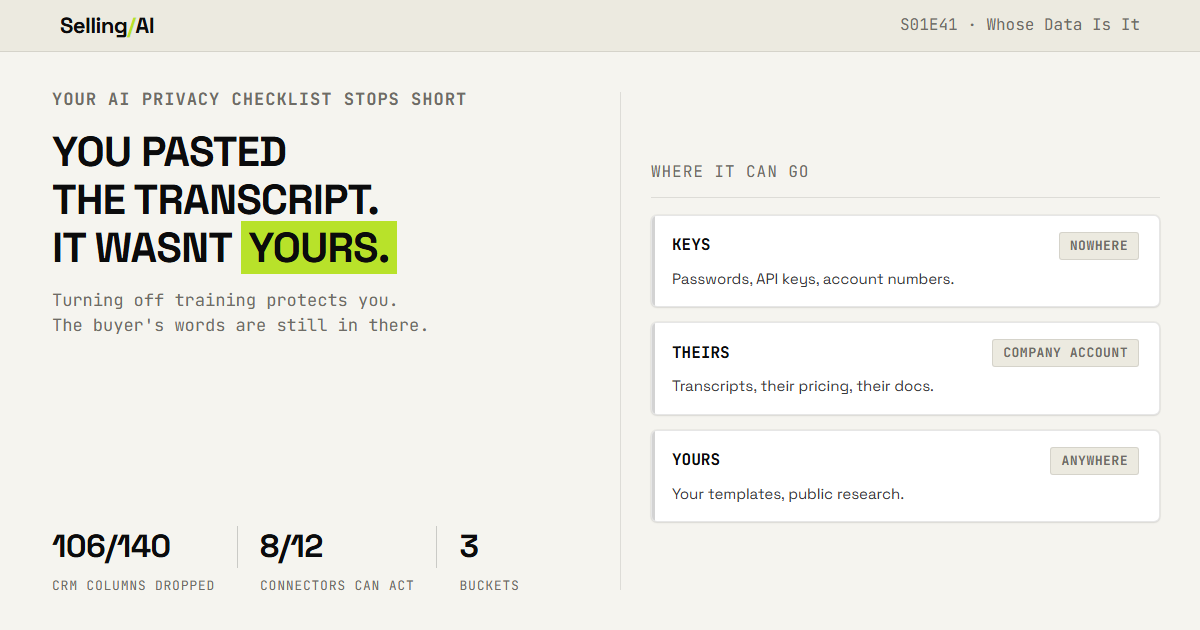
Every piece of sales data lands in one of three buckets, and the bucket decides where it can go.
Keys. Anything that gets someone into something: passwords, API keys, login links, recovery codes, full card or bank numbers. Goes nowhere, on any account. This is Daniel's point five, and it's the only bucket with no exceptions.
Theirs. Anything a buyer, customer, partner or your own company told you or gave you: transcripts, recordings, their numbers, their docs, their people, your forecast. Goes only into an AI account your company approved, and only the part the question needs.
Yours. Your own templates, frameworks and writing, plus anything public. Goes anywhere.

If you only have a personal account, Theirs goes nowhere until it's masked. Step 3 covers that.
Four steps. Plan on about an hour the first time.
Step 1: The Settings Sweep
Start with Daniel's first move, because it's the cheapest thing on this list.
ChatGPT: Settings, then Data controls, then "Improve the model for everyone." It's on by default for personal accounts. Turn it off and your new chats stop being used for training (OpenAI's data controls FAQ).
Claude: Settings, then Privacy, then "Help improve Claude." Anthropic made every Free, Pro and Max user pick a side on this in 2025, and the choice matters more than it looks. On means your chats can be kept for up to five years. Off means 30 days (Anthropic's announcement). Company accounts on Claude for Work arent part of that setting.
Then memory, which is where Daniel's point seven gets sneaky.
In ChatGPT, deleting a chat doesnt delete what it remembered from that chat. OpenAI says so in its own Memory FAQ: saved memories live separately, and you remove them in Settings, Personalization, Manage memories. So if you told it about a deal in the spring and deleted the chat, the deal can still be in there.
Claude has had memory on every plan, free included, since March (Anthropic). Its Incognito chats dont save to memory and dont get used for training.
Last, temporary chat. Temporary is a retention policy, and a policy can change underneath you. From May to late September 2025, a court order in the New York Times lawsuit made OpenAI keep ChatGPT logs it would normally have deleted (Engadget). For about four months, deleting a chat didnt mean it was gone. Temporary chat is still worth using. Just read it as "out of my history," never as "gone."
Now ask your AI what it's carrying:
List everything you currently remember or have saved about me across our
conversations. Group it under:
1. My job and my company
2. Prospects, customers and deals (any company or person names)
3. Money: pricing, quotas, comp, budgets
4. Personal: family, health, anything else For each item, give me one line and say whether you'd still need it to
help me with sales work. Don't leave anything out because it seems minor.
Then check that answer against the actual memory page. The AI's answer is a summary, and the settings page is the real list. Delete anything in groups 2 and 3 you wouldnt want the buyer to read.
Write down one line per app when you're done. "ChatGPT: training off, memory checked, 4 deleted." That line is what you re-check next quarter.

Step 2: The Data Map
Now sort everything you touch in a normal week into the three buckets. This prompt is safe to run anywhere, because you're describing the kinds of data, not pasting any of it:
I'm a [ROLE] selling [WHAT YOU SELL] to [WHO YOU SELL TO]. I want a map of
the data I handle, so I know what can go into AI and where. Here is everything I touch in a normal week. Kinds of data only, no real
names or numbers:
[LIST IT. For example: call recordings, transcripts, discovery notes, CRM
exports, pricing sheets, docs the buyer shared, contracts and redlines,
forwarded emails, org charts, LinkedIn research, my own templates.] My AI accounts: [for example: personal ChatGPT Plus, company Claude for
Work, the AI inside my CRM, my meeting notetaker] Sort every item into one bucket:
- KEYS: gives access to something (passwords, API keys, login links, account numbers). Goes nowhere.
- THEIRS: a buyer, customer, partner or my company told me or gave me this. Goes only into a company-approved account, and only the part the question needs.
- YOURS: mine, or public. Goes anywhere. Then make a table: item, bucket, which of my AI accounts it can go into,
and anything I should check first (an NDA, a contract clause, a buyer who
asked not to be recorded, my company's AI policy). Flag anything you're unsure about instead of guessing.
Read the last column twice. That's where you find out what you already agreed to.
When a row could go either way, use the buyer test: if this buyer scrolled through your AI history, would they be fine with what they found? If you hesitated, it's Theirs.
Step 3: Headers, Not Rows
Daniel's point four, give it the minimum, is the one everybody agrees with and almost nobody does. Cutting a spreadsheet down by hand is tedious, so the whole CRM export goes in.
So let AI decide what to cut, without ever seeing the data. Copy only the top row of your export (the column names) and paste that in with your question.
I want to answer this question with AI: [YOUR QUESTION, for example "why
did deals stall in stage 3 last quarter?"] I am NOT pasting my data. Here are only the column headers from my export:
[PASTE THE HEADER ROW] For each column, tell me one of:
- KEEP: the question needs it
- MASK: the question needs the pattern, not the real value (names become "Account 1" and "Contact 2", exact dollar amounts become ranges, emails and phone numbers get deleted)
- DROP: not needed Default to DROP when unsure. Then show me what the cleaned file should
look like, with three made-up example rows.
Delete the DROP columns in your spreadsheet, do the MASK swaps with find and replace, and only then upload it.
I ran it against my own HubSpot. A deal record there has 140 columns. 20 came back KEEP, 14 came back MASK, and 106 came back DROP... so 106 of 140 columns never needed to leave my computer, and the AI didnt see a single deal to figure that out. It also caught two that are easy to miss: the champion and economic buyer fields hold real people's names (it turned those into Yes or No), and one column is nothing but a list of email addresses.
Transcripts dont have headers, so do the swap yourself before you paste. Find and replace each person with their role (CFO, Champion, IT Lead) and the company with "the Buyer." Keep that swap list in a note on your own computer so you can put the names back in the output afterwards.
One honest limit here: masked isnt anonymous. A transcript that says "the Buyer" but also mentions their 400 stores in Ohio and their CEO's podcast is still obviously their transcript. Masking lowers the risk, and it doesnt turn Theirs into Yours.
Step 4: The Connector Audit
Daniel's point six says audit what you've connected. Do it with two extra columns, because sales adds two things to worry about: what each connection can do, and whether it reads anything written by people outside your company.
Open your connector settings (in Claude that's Settings, Connectors, and in ChatGPT it's Settings, then Apps, or Plugins on some accounts). Add your meeting notetaker, the AI inside your CRM, and any browser extension that reads the page you're on. Then:
Here is every app I have connected to my AI, plus every AI tool that
connects to my accounts (notetakers, browser extensions, the AI in my CRM):
[LIST: name, and what you think it can do] Make a table with one row per connection:
1. What it can READ
2. What it can DO: draft, send, edit, delete, buy, share, run jobs
3. STRANGERS: does it read anything written by people outside my company? (inbound email, calendar invites, shared docs, web pages, meeting audio)
4. When I last used it, if I know
5. Verdict: - CUT if I haven't used it in 60 days - GATE if column 3 is yes AND column 2 is anything beyond reading. That means it must ask me before every action - KEEP otherwise Sort CUT to the top, then GATE.
GATE is the important one. A connection that reads strangers' writing and can also act is the EchoLeak setup. You can keep it connected, as long as you're the one who says yes before it does anything.
Here's mine.
12 outside services, plus my browser. 8 of the 12 can change something instead of just reading it, anywhere from deleting an email to buying a domain. And 4 of my connections read things strangers write (email, calendar invites, shared files and web pages). All 4 of those can also act.
I'm keeping most of them. I build with this stuff, and the access is the point. What I changed is the GATE column: nothing that reads a stranger's email gets to act on it without me clicking yes first.
And your notetaker gets one extra line no matter what the table says. Open every call that it joins with something like "I've got [tool] taking notes so I can actually pay attention to you. Is that alright with everyone?" Wait for each person to say yes. If someone says no, turn it off where they can see you do it.
Why This Works
Because the bucket decides, so you dont have to. Most oversharing happens at 4:55 on a Thursday when you just want the recap written. If you already decided Theirs only goes into the company account, there's nothing left to decide at 4:55.
Because headers-not-rows keeps the data on your computer. The AI does the thinking about what's needed and only ever sees column names.
Because the audit finds what you forgot you connected. Nobody remembers every "allow" they clicked. The table does.
Because it's how you'd want your vendors to treat you. You'd want to know if a vendor's rep was pasting your CFO's email into their personal chatbot. Your buyers would too.
What's still unsettled. The line between Theirs and Yours gets blurry fast. Is your call summary yours, because you wrote it, or theirs, because it's built out of what they said? My rule is to treat it as theirs, because that's the call I could defend if a buyer ever asked. But it makes the whole system harder to follow, and I havent settled it.
Rep Action this week
Do the settings sweep today. It's five minutes, and it's the only part of this with no downside.
Then before Friday, build your data map and run the connector audit.
The number to watch is your GATE count: connections that read strangers' writing and can act without asking you. You want that at zero.
And one question, because the answer decides what I write next... are you using AI for sales work on a company-approved account, or your personal one? Hit reply with one word: approved, personal, or "no idea." If most of you say personal, I'll write about how to get one approved.
~ Jay
The free section sorts your data and closes the gaps you can see. The Vault has the three pieces that take longest to build yourself... a data map already filled in for a sales job, the full masking round trip, and exactly what to say when a notetaker joins a buyer call.
This week in the Vault:
The Sales Data Map. Every kind of data a seller touches, already sorted into Keys, Theirs and Yours, with where each one can go on a personal account and on a company one.
The Mask and Restore Prompts. A round trip that swaps names and numbers out before an AI sees a transcript, then puts them back in the finished work.
The Notetaker Line. What to put in the calendar invite, what to say when the call starts, and what to do when a buyer says no.
Members get every Vault drop plus the full back library. $20/mo, or $140/yr and save $100.
Click here for the stack I’d build today: https://www.sellingwithai.vip/stack

You just read the motion. Now run it.
The prompts, checklists, and templates that turn this into a 10-minute execution are in the Vault.
Vault access includes:
- Copy and paste execution prompt packs
- Deal, outbound, and follow-up playbooks
- Operating checklists for every motion
- Members Vault access
