Sep 29, 2026
by Jay Campbell
S01E39: Half My Agents Were Quiet Quitting. So I Fired Them.
The short answer
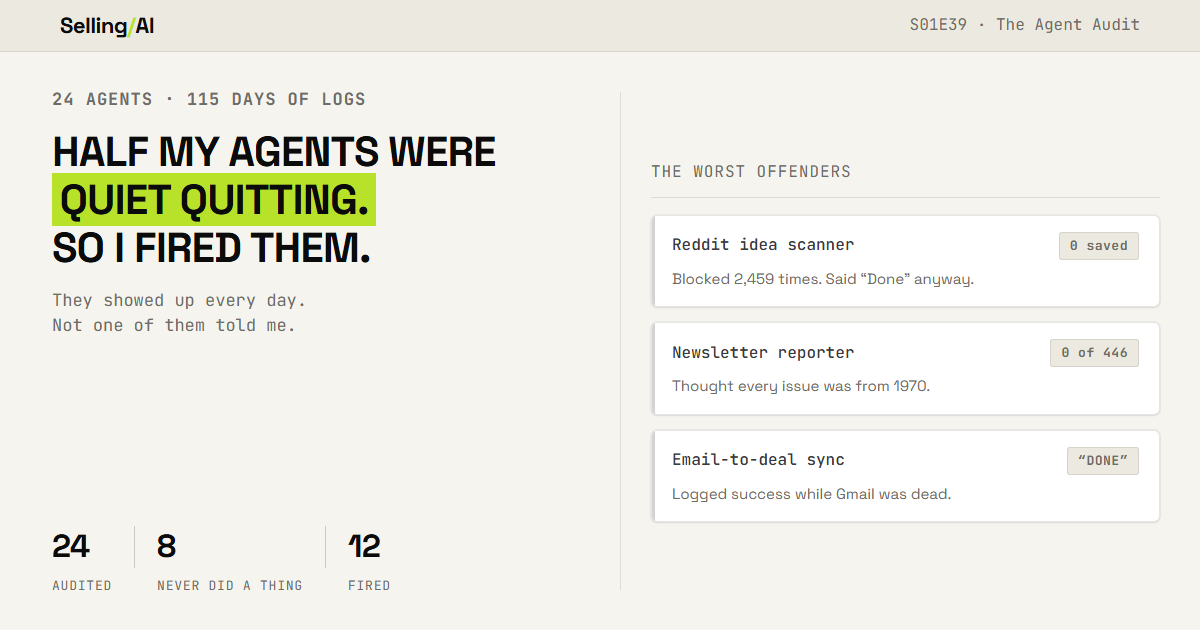
I audited all 24 agents I run on autopilot. 8 had produced nothing in 115 days, and not one of them told me. Here is the 4-step audit to run on yours: list what each should deliver, define broken, build an alarm, fire what you stopped using. Prompts included.
And I meant every word of it. The 7am briefing waiting for me before I touched a keyboard. The buying signal scan across my prospect list. The deal scoring. A newsletter draft every Sunday morning. And "22+ scheduled background jobs" running without me touching anything (yes, I actually wrote that).
Well... it's September now. So I went back and counted.
Of the seven background jobs I bragged about in that issue, one is still running. (I'll get to the other six.) And for 12 days this month, my agent kept showing up every day like nothing was wrong... doing everything it always does, except the calendar and email parts of its job. Those just came back empty.
And I didnt notice... for 12 days.
If you've set anything up to run without you (a morning summary, a buying signal alert, a note taker that pushes call notes into your CRM, a sequence), this one's for you. Because you've got the exact same exposure I had, you just might not know it yet.
When an AI agent breaks, it almost never breaks loudly. Sometimes it just stops showing up. Sometimes it keeps showing up on time, looking totally normal... with nothing in it. And honestly, either way it looks a whole lot like a slow day.
So this week I'm going to show you what broke, what I built so it cant break quietly again, and the four-step check you can run on your own agents before Friday.
(Quick note for the OGs: Jarvis is Mira now, and lives in Discord instead of Telegram. Long story... for another issue.)
Why Set-and-Forget Automation Fails
So here's what actually happened.
On September 10th, the token that connects Mira to my Google account died. A token is basically a saved login... it's what lets software get into your email and calendar without asking for your password every single time. When it dies, the software just cant get in anymore, and nothing tells you.
From that point on, Mira couldnt read my calendar, my inbox, or my task list. But it kept running anyway, and everything else kept working. But everywhere my calendar and my inbox were supposed to be... nothing. Every time it tried, it hit the dead login, wrote a line to an error log nobody reads, and moved on (the calendar check alone wrote 6,286 of those lines in a single week). Not even a "hey, something's broken."
An empty calendar looks like a light day. An empty inbox looks like a quiet morning. I didnt think twice about either one, for 12 days straight.
Now, before you're all like "but Jay... dont you have monitoring on this thing?"
Yes. I did. I had a script checking every single minute whether Mira was up and running. And it was! The whole time. That check said everything was fine for all 12 days, because Mira was up... it just couldnt reach anything it actually needed.
Then I went digging and found something worse. Mira has its own email address. It's the one I forward stuff to when I want it filed away for later (I told you about this in March). That inbox had been disconnected since June 4th. That's 110 days. Anything I forwarded in that time just sat there, and nothing told me.
Then I audited every job Mira runs, and found the one that stings the most for this newsletter. Its whole job is to report on how each issue of Selling with AI performs. Over the last 115 days it ran 446 times... and reported nothing. Not one report, while I published 17 issues. Every single run logged "No new posts to report."
The reason is almost funny. It was reading every issue's publish date wrong, as if I'd published all of them in January 1970... so nothing ever looked new. You can see it in the log below: 443 runs of "No new posts to report," and then every one of my issues dated 1970-01-21.

And that's the pattern I want you to see. Broken automation almost never crashes where you can see it. It keeps running and it keeps delivering... it just delivers less, and less looks exactly like normal. The monitoring I had was checking whether the software was turned on, which was the one thing that was never broken.
When you set something up and walk away, you're trusting that you'll hear about it if it breaks. But for most setups, what you hear when it breaks is... nothing. Which is also what a normal day sounds like.
Check the Output, Not Whether It Ran
Here's where I landed. An agent is working when the thing it's supposed to hand you actually shows up, with something real in it. That's the check that matters. Whether it ran is the easiest thing in the world to check, and it's the one that told me nothing for 12 days.
Last week in S01E38 I told you to re-check which AI you're paying for, because those tools keep changing after you stop looking. This is the same problem, just one layer down... the stuff you built on top of those tools keeps breaking after you stop looking.
Four steps. Plan on about an hour the first time through, and each step leaves you with something you keep.
Step 1: The Expected-Output List
Write down everything that runs without you. Next to each one, write exactly what it's supposed to hand you, and when.
I thought I knew what I had. I didnt. Mira had 37 scheduled jobs in its code, and 13 were already switched off. Of the 24 still running, 8 hadnt produced a single thing in the 115 days my logs go back. And in the last week, 11 of the 23 that were supposed to run produced nothing at all.
That's the actual list below, straight out of Mira's code. Every line with // in front of it is a job that was already switched off.


You dont need to write any code for this step. You just need an honest list... and AI is really good at pulling one out of a messy brain dump.
Use this prompt:
I want an inventory of every automation and AI agent I rely on. Here is everything I've set up to run without me. Include tools, scheduled
tasks, integrations, sequences, note takers, CRM syncs, alerts, anything:
[LIST EVERYTHING YOU CAN THINK OF. MESSY IS FINE.] Turn it into a table with one row per item:
1. Name
2. What it is supposed to produce. Be specific: "a summary of yesterday's calls in my inbox," not "call notes"
3. Where that output lands (inbox, CRM field, Slack, a doc)
4. When it should arrive (a time, a trigger, or a frequency)
5. What it depends on to work (accounts, logins, integrations, API keys)
6. What I actually do with the output Then ask me three questions to find what I forgot: automations running inside
tools I use every day, integrations someone else set up, and anything I turned
on during a free trial.
Pay attention to column 5. It's the one everybody skips (I did), and it's the one that would have saved me. Anything that depends on a login dies the day that login does.
Step 2: The Failure Signature

Now, for every row on that list, decide ahead of time what "broken" looks like... so you can actually tell it apart from "quiet."
There are basically three ways this stuff breaks:
it doesnt show up at all
it shows up empty (or half empty)
it shows up on time, with something old or wrong in it
Use this prompt:
Here is my automation inventory:
[PASTE THE TABLE FROM STEP 1] For each row, write its failure signature in three parts:
1. MISSING: what I would see if it stopped running entirely, and how long before I would notice without help
2. EMPTY: what it looks like if it runs but cannot reach its data, and how that could be mistaken for a normal quiet day
3. WRONG: what stale or incorrect output from it would look like Then give me one check per row that tells "broken" apart from "quiet."
Something I can see in under ten seconds. Flag every row where a failure would look exactly like a normal day. Put
those at the top.
And if any of your agents are AI prompts that run on a schedule (like a scheduled task in ChatGPT or Claude), add this to the prompt itself. It turns a quiet failure into a loud one:
Before anything else: if you could not access any source this task needs,
name it in the first line, in capitals. Still send the report. Never skip
it, and never show an empty section as if there were nothing to report.
My agent should have told me "I CANT REACH YOUR CALENDAR" in all caps, first thing. Instead it showed me nothing where my calendar should be...
Step 3: The Broken Indicator

Take the rows you flagged at the top of step 2, and give each one an alarm.
The same day I found the outage, I added a check that reads Mira's logs for that exact error. So now if it happens again, I'd hear about it in under 15 minutes instead of 12 days... and it'll keep bugging me every six hours until it's fixed.
Building it taught me three things.
Check the output (or the error), never just whether the thing is on.
The alarm cant depend on the thing it's watching.
Have it tell you when it's fixed.
Use this prompt:
Here are the automations where a failure would look like a normal day:
[PASTE THE FLAGGED ROWS FROM STEP 2] Here are the tools I already use that could send me an alert:
[EMAIL, SLACK, TEXT, A TASK LIST, ETC.] For each one, design the simplest possible broken indicator:
1. What it checks: the output or a specific error, never just "is it on"
2. How often it checks
3. Where the alert goes. It must not depend on the automation it is checking
4. What the alert says, in one line I would act on
5. How it stops: what "fixed" looks like Prefer something I can set up today with tools I already have over something
better that needs a developer.
Step 4: The 30-Day Kill List
Okay, so here's the part I havent told you yet. Those 12 days didnt cost me a thing... no missed meeting, no dropped follow-up, nothing I can point to.
And that turned into the most useful question in this whole thing. If something can be broken for 12 days and it doesnt cost me anything... why was it running at all?
Use this prompt:
Here is my automation inventory, with the date I last acted on each output:
[PASTE THE TABLE, ADD A "LAST ACTED ON" DATE TO EVERY ROW] Sort every row into one of three lists:
KEEP: I acted on its output in the last 30 days, and it is working
FIX: I would have acted on it, but it is broken or unreliable
KILL: I have not acted on its output in 30 days, or it could fail for a week without costing me anything For every KILL, list what it still has access to (accounts, logins, data),
so I can disconnect it instead of just ignoring it.
That last line is more important than it looks. An agent you stopped paying attention to still has every login you ever gave it.
Why This Works
Because I measured the gap on my own system. The same failure went 12 days without anyone noticing. With the alarm in place, it would reach me in under 15 minutes.
Because it goes after the failures that actually last. A loud crash gets fixed the same day, because you cant miss it. The longest failures on my system (12 days, 110 days, and one that failed every single day from June 3rd until I looked) all looked like a normal day the whole time.
Because the alarm lives outside the thing it's watching. If the monitor is built inside the agent, it goes down with the agent. Mine goes around Mira, so Mira cant take it down.
Rep Action this week
List every agent and automation you have. All of them... not just the AI ones.
Then pick three. The three you'd bet money are working right now. Open the last five things each one produced and read them (like, actually read them).
The number I want you watching is how many of those three were actually working.
And one question for you, because I genuinely dont know the answer and it's going to decide what I test next... which of your agents would you not notice if it stopped? Go check it, then hit reply and tell me what you found. Working, broken, or something you forgot you even set up.
~ Jay
The free section gets you the list, the failure signatures, and the idea of an alarm... but an alarm you have to design from scratch is an alarm most people never build (I know, because it took a 12-day outage for me to build mine).
This week in the Vault:
The Failure Signature Library. Missing, empty and wrong, already written out for the six sales agents most of you are running, plus the 10-second check for each one.
The Heartbeat Kit. One line you paste into any scheduled agent so it reports its own numbers, plus a separate canary that tells you the day those numbers stop showing up.
The 30-Day Agent Review. The monthly check that decides what stays and what gets fired, and exactly where to go to cut off everything a fired agent can still get into.
Members get every Vault drop plus the full back library. $15/mo, or $100/yr and save $80... and this is the last week at that price. Next week the Vault goes to $20/mo or $140/yr. If you're already a paid member, you keep the price you have now.
Click here for the stack I’d build today: https://www.sellingwithai.vip/stack

You just read the motion. Now run it.
The prompts, checklists, and templates that turn this into a 10-minute execution are in the Vault.
Vault access includes:
- Copy and paste execution prompt packs
- Deal, outbound, and follow-up playbooks
- Operating checklists for every motion
- Members Vault access
