Oct 6, 2026
by Jay Campbell
S01E40: ChatGPT to retire Custom GPTs on Dec. 11. Don't get left behind
The short answer
OpenAI retires custom GPTs on December 11. Here's how to move your instructions out of ChatGPT, Claude and Gemini into files you own, then test them in any AI.
/

This week in AI Sales
OpenAI is retiring custom GPTs on December 11th. Every plan, and personal accounts already cant create new ones. That's this week's story, below.
Attio now logs everything its agents do. As of September 23rd, the agent log shows every tool an agent called, every record it changed, and the credits it used. If you let an agent write to your CRM, this is the receipt you want before you trust it.
ChatGPT ads can now land leads straight in HubSpot. OpenAI published the setup guide: create the campaign in HubSpot, new leads go into your CRM, follow-up workflows fire from there. Works on the free Marketing Hub. Worth a look before you spend a dollar on it.
Let’s begin
Back in May I wrote an issue about your AI having no memory (S01E17), and there's one line from it I keep coming back to. I said that when you rely on the AI's built-in stuff, "you're a tenant on their land." If ChatGPT has a bad update, your assistant's brain stays behind.
Well... the landlord just sent the notice.
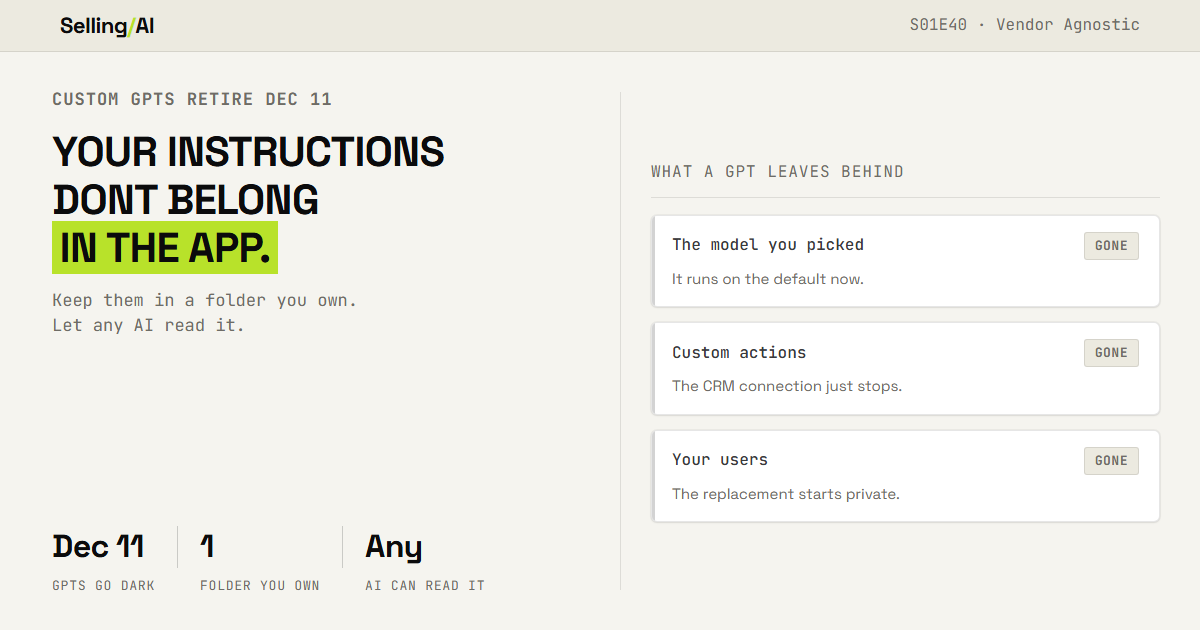
OpenAI is retiring custom GPTs. All of them, on every plan. On December 11th, custom GPTs and their pages go dark (that's from OpenAI's own FAQ, not something I read on LinkedIn). And if you're on a personal account, you already cant make a new one.
I've got GPTs of my own on that list, and some of you use them. So yes, I'm cleaning this up too.
But the GPT thing is just the one that happened to make the news this month. If the instructions that run your sales work live inside somebody's app... a GPT, a Claude Project, a Gemini Gem, a Perplexity Space, that "custom instructions" box in settings... then somebody else decides when they stop working. Could be OpenAI this year. Could be whoever you're using next year.
So this week we're getting your instructions out of every app and into a folder you own... and then proving they still work no matter which AI reads them (Claude, Gemini, ChatGPT, Perplexity, or a model running on your own computer).
Why Keeping Your Instructions in the App Fails
Let's use the GPT retirement as exhibit A, because OpenAI was nice enough to write down exactly what survives.

When you migrate a GPT into its replacement (OpenAI calls them plugins), your instructions and your knowledge files come with you. Here's what doesnt:
the model you picked. It runs on whatever the default is now
custom actions. If your GPT talked to your CRM or a form, that connection just stops. OpenAI says rebuilding it "may require a custom MCP server and technical setup" (which is a polite way of saying call your engineer)
your conversations. They stay with the old GPT, and the old GPT goes away
the people using it. Sharing settings dont carry over, and the new plugin starts private
And the moment you migrate, the original goes read-only. You cant edit it, and you cant delete it either.
Now... none of that is OpenAI being evil. Products change. That's the point. Every one of these apps has changed how its instructions work at least once, and every one of them will again. Anything you built inside the app has to move when the app moves, on the app's schedule, with whatever the app decides to carry over.
And the worst part is how normal it feels. You open the GPT, it works. You open the Claude Project, it works. Nothing about a working tool tells you that you dont actually own it.
Your Instructions Live in the Repo. The App Just Reads Them.
If you read the codebase series, you know where this is going. A repo is just a folder. The instructions for every AI workflow you run live in that folder, as plain text files. The apps get a copy. You keep the original.
Then when an app retires something, changes a model, or you just find a better tool, you dont rebuild anything. You hand the same file to the next one.
Four steps. Plan on about an hour the first time, and each step leaves you with something you keep.

Step 1: The Lock-In Audit
Find every place your instructions live inside an app right now. All of them... not just the GPTs.
Check each app you pay for (or use for free):
ChatGPT: your GPTs, Projects, and custom instructions in settings
Claude: Projects, custom styles, and your profile preferences
Gemini: Gems
Perplexity: Spaces
anything else with a box you typed "always do this" into (your CRM's AI, your note taker, your sequencer)
Then use this prompt (in any AI, it doesnt matter which):
I am moving every set of AI instructions I rely on out of the apps and into
files I own. Here is everything I found. For each one, the app, the name, and a one-line
description of what it does:
[LIST EVERYTHING. MESSY IS FINE.] Turn it into a table with one row per item:
1. App and name
2. What it does, in one line
3. How often I use it
4. Does anyone else use it? Who, and how do they get to it
5. Does it depend on anything that only exists in that app (a connection to another tool, an uploaded file, a specific model, saved memory)?
6. Lock-in risk: HIGH if it would stop working or disappear if that app changed tomorrow and I have no copy of it anywhere else. LOW if I already have the instructions saved outside the app Sort HIGH to the top. Then ask me three questions to find what I forgot.
Column 5 is the one to stare at. That's the stuff that wont travel on its own.

Step 2: The Repo
Make one folder. Call it whatever you want. If you built a codebase with me back in the spring, use that one.
Then for every HIGH row, copy the instructions out of the app, word for word, and turn them into a file. One workflow, one file. The name at the top, one line on when to use it, then the instructions. Any reference files go right next to it in the same folder.
Use this prompt to clean each one up so it works outside the app it came from:
I copied these instructions out of [APP]. I want a version that works in
any AI, not just this one. Here are the instructions, exactly as they were:
[PASTE] Here are the files it used:
[FILE NAMES + ONE LINE ON EACH] Rewrite it as a single plain-text file:
- First line: a short name
- Second line: one sentence on WHEN to use it, in the words I would actually type when I need it
- Then the instructions. Keep every rule and every example from the original, word for word where possible
- Remove anything that only makes sense inside [APP] (buttons, features, "use the code interpreter", references to a specific model)
- Add a "Reference files" section naming each file and when to use it After the file, list anything the original depended on that will NOT work
outside [APP], so I know what still needs fixing.
And put a date at the top of every file. You'll see why in step 4.

The members vault has 100% access to all previous GPT’s that have since been converted into skills (or plugins)
Step 3: The Swap Test
This is where you find out if you're actually vendor agnostic, or you just moved your stuff into a folder.
Take one file from step 2. Pull four prompts you've actually used with it... three normal ones and one hard one (the weird edge case, the one that only works because of some rule buried in the instructions).
Now run all four through three different AIs using that same file. For me that's Codex, Claude, and a model running on my own computer. For you it's whatever you've got access to. The free versions are fine for this.
Then paste everything into this:
I am testing whether one instruction file works the same across different AIs. Here is the instruction file:
[PASTE THE FILE] For each test prompt, here are the answers from each AI:
PROMPT 1: [PASTE]
[AI 1]: [PASTE ANSWER]
[AI 2]: [PASTE ANSWER]
[AI 3]: [PASTE ANSWER]
[REPEAT FOR PROMPTS 2 TO 4. PROMPT 4 IS THE HARD CASE.] Score every answer against the instruction file, not against each other:
1. MATCH, CLOSE, or BROKE
2. What went wrong: ignored a rule, wrong format, missing information, did not use a reference file
3. The one sentence I would add to the instruction FILE to fix it Then give me a score per AI (for example, 4 of 4, 3 of 4, 2 of 4) and the
single change to the file that would help most across all of them.
The fix always goes in the file, never in the app. If one AI needs a special tweak to work, write the tweak into the file so they all get it.
Step 4: The Thin Wrapper
Now go back into each app and replace what's in there with the file.
Most apps cant read a folder on your computer, so the app still holds a copy. That's fine. The rule is just that you never edit in the app. If something needs to change, you change the file, bump the date at the top, and paste it back in.
That date is how you catch a stale copy. If the date in the app doesnt match the date in your folder, the app is running old instructions.
And if other people use something you built (like a GPT), send them the file too. Then it doesnt matter what app they're in.
Why This Works
Because the retirement notice cant touch it. When December 11th comes, my GPTs go away and my instructions dont, because the GPT was never more than a copy.
Because the Swap Test is proof, not a promise. Anyone can say they're vendor agnostic. The scorecard tells you whether your files actually work in more than one place, and exactly what to fix when they dont.
Because you pick the AI per job, not per habit. Once the instructions dont care which model reads them, you can move to whatever is best (or cheapest) for each workflow. That's what S01E38 was about, and it's a lot easier when switching costs you nothing.
What's still unsettled. The instructions travel. The connections dont. Anything that reaches into another tool (your CRM, your inbox, a custom action) is still built differently in every app, and that part you'll rebuild each time you move. Same goes for whatever an app "remembers" about you. I havent found a clean answer for either yet.
Rep Action this week
Do the lock-in audit. Count how many places your instructions live inside an app.
Then pick the one you'd miss most, get it into a file, and run the Swap Test on it before Friday. One file. Three AIs. Four prompts.
The number to watch is the worst score out of the three. That's how agnostic you actually are.
And one question for you, because I genuinely dont know and it'll shape what I build next... if one of your AI vendors shut you off tomorrow, which workflow dies with it? Hit reply and tell me.
~ Jay
If you use one of my GPTs: they go away December 11th like everyone else's. I've already converted them into files you can use in any AI, and they're in this week's Vault.
The free section gets your instructions out of the apps and proves they travel... but the fastest way to do this is to not start from a blank folder. So this week the Vault has the folder already built.
This week in the Vault:
My GPTs, Converted.
The Starter Repo. The folder structure I use, with a template file, the date header, and a one-page readme on how to load it into ChatGPT, Claude, Gemini and Perplexity.
The Swap Test Scorecard. A fill-in sheet that tracks every workflow from lock-in audit to tested in three AIs, with the worst score up top.
Members get every Vault drop plus the full back library. $20/mo, or $140/yr and save $100.
Click here for the stack I’d build today: https://www.sellingwithai.vip/stack

You just read the motion. Now run it.
The prompts, checklists, and templates that turn this into a 10-minute execution are in the Vault.
Vault access includes:
- Copy and paste execution prompt packs
- Deal, outbound, and follow-up playbooks
- Operating checklists for every motion
- Members Vault access
