Sep 1, 2026
by Jay Campbell
S01E35: Claude Can Send Your Email Now. Mine Made Things Up.
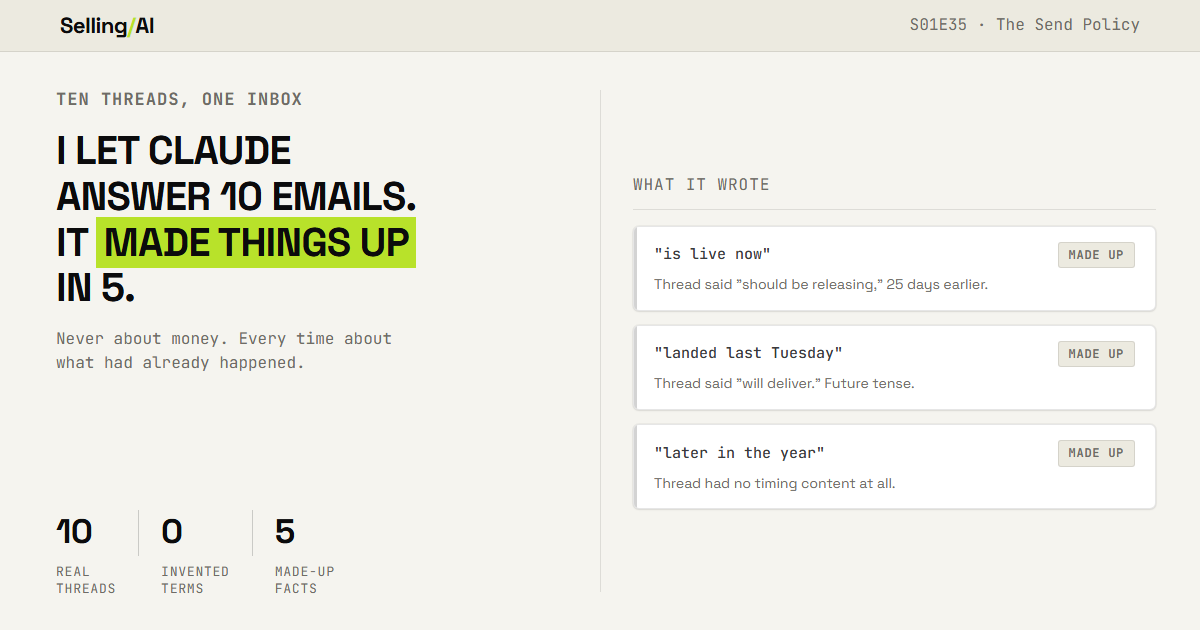
Five times out of nine it was wrong.
The short answer
Anthropic shipped write actions to the Google Workspace connector, so Claude can send, reply and forward from your Gmail. I tested it on ten live threads. It never invented a price, a discount or a term. It made things up five times out of nine, every one about something that had already happened. Here is the three-step check that catches it, with prompts.

Lets begin
There’s a guy I’ve been talking to since June who told me he’d pilot a piece of software I’ve been working on the moment there was a Mac version.
On July 30 I told him it should be out in about seven days. It ended up taking a bit longer than that, and I didnt email him again for 25 days. Sorry about that, Jesse!
Last week Claude wrote to him for me. First line:
Mac version is live now, so whenever you're ready to pilot I'll get you a build.
Claude
Nothing in that thread says the Mac version shipped. I made a forecast that expired eighteen days earlier, and then nothing from either of us. The model took "should be releasing" and wrote "is live now" under my name.
It was right. The build had just been completed a few days ago… but I hadn’t made that claim public anywhere at that point.
Thats the part that should bother you, and it took me a minute to work out why.
Anthropic shipped write actions to the Google Workspace connector, which is how it got the chance. Their own documentation says it plainly: "Send, reply to, and forward emails from Gmail. By default, Claude asks for your approval before each of these actions."
By default. Thats a setting, not a standard. The same page says that on Team and Enterprise plans, "owners decide whether members can allow these actions to run without asking each time," so if you’re on a team the setting isnt even yours to change.
I could have read that page, written it up, and told you all to be careful. That’s the version of this issue that writes itself, and we’d have learned nothing.
So I gave it my actual inbox instead. Ten real, live email threads, people I’m genuinely mid conversation with. Nine of those conversations were carrying something a reply could get wrong: a price, a date, a key, a commitment. The tenth was a cold pitch I was turning down, so its out of every number below.
I had Claude draft the reply for each, left approval on, then traced every claim against the thread it came from… because there was no way I was pushing this to “live” without having ever tested it. And it does need to be tested… while I do not want to outsource my entire life to AI, I do think its smart to outsource the things you can, so you can put your energy into the things that matter.
I expected it to make something up about money. A price I never quoted, a discount I never gave, a term I never agreed to. It never did that… and those nine threads had prices and keys and expiry dates sitting right there.
It made things up everywhere else instead. Five times out of nine.
Continue 👇
Why Reading the Draft Isn’t Checking It
When an AI writes on your behalf, you are often checking it for tone.
That's the check nearly everybody runs and it's the wrong one, because tone is the easiest thing for a model to get right. Its got your last twenty messages right there in the thread. Nine of my ten came back sounding like me, and that proves nothing.
Heres what it doesnt have.
A connector is what gives Claude access to another system, in this case your Gmail. It reads the thread. It doesnt see your build pipeline, your calendar, your CRM, or whether the thing you promised last month actually went out.
So every gap the thread leaves open is a gap the model fills, and it fills them forward, in the direction that sounds like good news.
Last week's issue was about the promises you make out loud on a call and forget. That one showed up in writing, with my name on it, and I never made it.
It Doesnt Make Up Prices. It Makes Up Facts.
What Claude wrote | What the thread actually said |
|---|---|
"Mac version is live now" | "should be releasing in the next seven days," 25 days earlier |
"E33 landed last Tuesday, the one with the HubSpot tool" | "E33 will deliver on Tuesday, 8.18." Future tense, written before the send |
"those times for next week" | He said "next week" on the prior Thursday, meaning the week that had already started |
"I'll circle back later in the year" | Nothing. That thread has no timing content in it at all |
"happy to jump on 15 minutes" | I’d offered a demo. I never said how long |
Row four is the one Id look at hardest. Eleven days of silence on a thread where I'd asked for names and email addresses, and the model decided the silence meant bad timing. It invented that premise, then offered in my voice to circle back later in the year, on a deal I wanted closed that week. Two fabrications stacked: a reason, and a concession built on it.
Row three isnt even an invention and its worse for that reason. He wrote "next week" on a Thursday, meaning the week starting August 24. The model copied it into an email dated August 24, where it now points at the week of August 31. Nobody made anything up and the sentence is still false, because a relative date doesn’t hold still. It slides with the send date.
That one stung, because it's the same failure I'd already hit in my own software. It pulls commitments off call recordings, and early on it resolved "end of next month" against nothing and came back with the wrong year. The fix was putting today's date in the prompt. Same bug, different surface, and I still didnt see it coming.
Every one of those five reads exactly like something Id write. Thats not a compliment to the model, its the reason I nearly sent them.
Nobody’s lying. Its a model with one thread and a blank to fill, filling it the way you would if you were optimistic and in a hurry. That doesnt change the fact that it just totally made something up though.
Thats the failure that matters. Heres the one I enjoyed more.
I told it to return only the email body, nothing else. One draft came back with this sitting above the greeting:
I'll check the CRM and any prior notes on Jesse before drafting.
Me
Same Jesse. The guy I'd just apologized to for going quiet on him. A message addressed to him, referring to him in the third person, as a record with prior notes attached. Can you imagine if that actually sent?!?
Three steps, about 35 minutes. You’ll need Gmail connected and a Claude plan that includes it.
Step 1: Ten Threads, Ten Drafted Replies
Dont just pick easy ones. Pull across the classes you actually send: scheduling, a recap carrying terms, an onboarding meeting, a nudge on somebody gone quiet, and at least one where they pushed back on you.
Connect Gmail, leave approval ON, one at a time. Screenshot every draft before you approve or reject it, because that screenshot is the only record you get and its gone the second you click.
Read the Gmail thread with [PERSON] about [SUBJECT]. Write the reply I should send. Match how I write in this thread. Return only the email body. No preamble, no explanation, no notes to me.
Step 2: Trace Every Claim to a Line
Output: ten drafted replies, captured before anybody approved them.
This is the whole motion, one question asked of every factual statement in every draft:
Where in the thread does this come from?

Three answers. GROUNDED, you can quote the line. INFERRED, the thread makes it likely but doesn’t establish it. MADE UP, there’s nothing there and the model filled the gap.
Do not grade on whether the claim is true. That's the trap I nearly walked into on the Mac build: it was true, and it was also made up. Grade the grounds, not the outcome.
Here is an email thread, and a reply that was drafted for it. For every factual claim in the reply:
1. Quote the claim.
2. Quote the line in the thread that supports it, or write NO LINE.
3. Mark it GROUNDED, INFERRED, or MADE UP. Three things to check specifically:
- Anything stated as already done, sent, shipped, released, or completed.
- Any relative date (next week, end of month, in a few days). Resolve it against the date it was WRITTEN and again against today. Tell me if the meaning moved.
- Any number, duration, or timeframe I did not put in the thread myself. Do not tell me whether the claim is true. Tell me whether the thread supports it. A correct guess is still a guess. THREAD:
[PASTE] DRAFTED REPLY:
[PASTE]
Count the MADE UP rows. Thats your number.
Two bookkeeping notes. Throw out any thread with nothing in it to get wrong, the way I threw out that cold pitch, because counting it as a pass inflates your rate. And relative dates only fail once time has passed, so a thread you answered inside the hour isnt under test.
Output: a scorecard with a count and a denominator you’d defend.

Step 3: The Rule, and the Toggle That Matches It
Now sort your classes.
A class earns unattended send only if it scored zero MADE UP across every thread you tested. Everything else keeps the per message prompt. That's the whole policy, one line per class.
For me, scheduling and plain acknowledgements came back clean. Anything where I'd made a promise about my own software did not, and thats the class Id have automated first, because those replies are boring and there are a lot of them.
Here are my reply classes and the MADE UP count for each:
[PASTE YOUR COUNTS] For each class give me one line:
- The class name.
- SEND or HOLD.
- The single sentence pattern that would make me regret automating it. Then write me a note-to-self, under 100 words, that I'd still understand in six months when I've forgotten why I set this.
Then go set the toggle to match. If you’re on Team or Enterprise that control belongs to your workspace owner, not you, so the output of this step is what you send them.
Output: a one page send policy, dated, with a verdict per class.
Why This Works
Because it checks the thing that actually breaks.
Everybody is braced for a fabricated price. That class held, as you saw. What broke was quieter and more potentially even more important: five made up facts in nine threads, every one plausible, most probably correct.
A tool thats wrong in an obvious way trains you to check it. One thats wrong in a reasonable way, one time in two, trains you to stop.
Two things I havent solved. Step 2 costs more than Ive made it sound: deciding whether a claim is grounded means reading the whole thread properly, and fifteen minutes only covered ten replies because I knew those threads cold. And this is one inbox, mine, running a beta rather than a pipeline, with no live pricing negotiation in the window, so the money class never got a fair test. My numbers are a starting point, not a benchmark.
Which is why I want yours.
Did yours make something up, or did it behave? If most of you come back clean then my inbox is the outlier and Ill say so in print. If your numbers look like mine, the next issue is about what you’re allowed to automate.
Rep Action this week
Open your sent folder and find threads from the last ten days where you said something about your own product, timeline, or next step.
Not the whole folder. Ten. Pick ten.
Run the three steps.
By Friday youll have a number: how many drafted replies stated something the thread couldnt back up.
Reply with that number. Just the number is a complete answer.
~ Jay
The free motion checks ten replies by hand, which is the right way to find out what your own inbox does. It's the wrong way to keep doing it. The Vault version runs the same trace in bulk, then turns it around on the emails you sent yourself.
This week in the Vault:
The Grounding Pass. Runs the claim-by-claim trace across a whole batch of drafted replies in one go, so you get the scorecard without re-reading every thread yourself.
The Status Sweep. Points at your own sent folder instead of the AI's drafts, finds every claim you've made about something being shipped, sent, or scheduled, and flags the ones you never went back and confirmed.
The Class Card. Your reply classes with a SEND or HOLD verdict on each and the failure sentence that earned it, so you set the toggle once instead of re-deciding every week.
Members get every Vault drop plus the full back library. $15/mo, or $100/yr and save $80.
Click here for the stack I’d build today: https://www.sellingwithai.vip/stack

You just read the motion. Now run it.
The prompts, checklists, and templates that turn this into a 10-minute execution are in the Vault.
Vault access includes:
- Copy and paste execution prompt packs
- Deal, outbound, and follow-up playbooks
- Operating checklists for every motion
- Members Vault access
